Open Editor Login

Notepad Just Got Upgraded

A lightweight online code editor for web development!

CODAX brings you essential coding features without the complexity of professional IDEs. Perfect when you need more than Notepad but less than Pro Code Editors!

Why Choose CODAX ?

All the essential features you wish Notepad had

Syntax Highlighting

Color-coded syntax for multiple languages makes your code easier to read and write.

Multiple Files

Work with several files at once with our simple tab interface.

Multitasking & Code Search

Easily switch between files and search your code to quickly find what you need, improving your workflow and productivity.

Best Theme

Enjoy the best theme designed for comfort and style, offering an optimal coding experience.

Web-Based

Access your editor from any device with a browser. No installations required - just open and code!

Built-in AI: CODAI

Get coding assistance, smart suggestions, and error detection right inside CODAX with CODAI, our integrated AI-powered assistant.

Supported Languages

Currently supports core web technologies

HTML

Used for creating the structure and content of web pages

CSS

Used for styling and layout of web pages

JavaScript

Used for adding interactivity and functionality to web pages

About CODAX

A lightweight code editor for modern web development

CODAX is a user-friendly code editor designed for web developers. It offers a simple yet powerful environment for working with HTML, CSS, and JavaScript. CODAX provides the essential tools for coding without unnecessary complexity, making it the perfect choice for developers who want a clean, efficient workspace.


Our mission is to offer a fast, clean coding environment that launches instantly and works anywhere. Unlike heavy development tools, CODAX focuses on core web technologies while keeping the interface intuitive and responsive.


Whether you're making quick edits, learning web development, or need a lightweight alternative to resource-intensive editors, CODAX provides the perfect balance of features and simplicity.
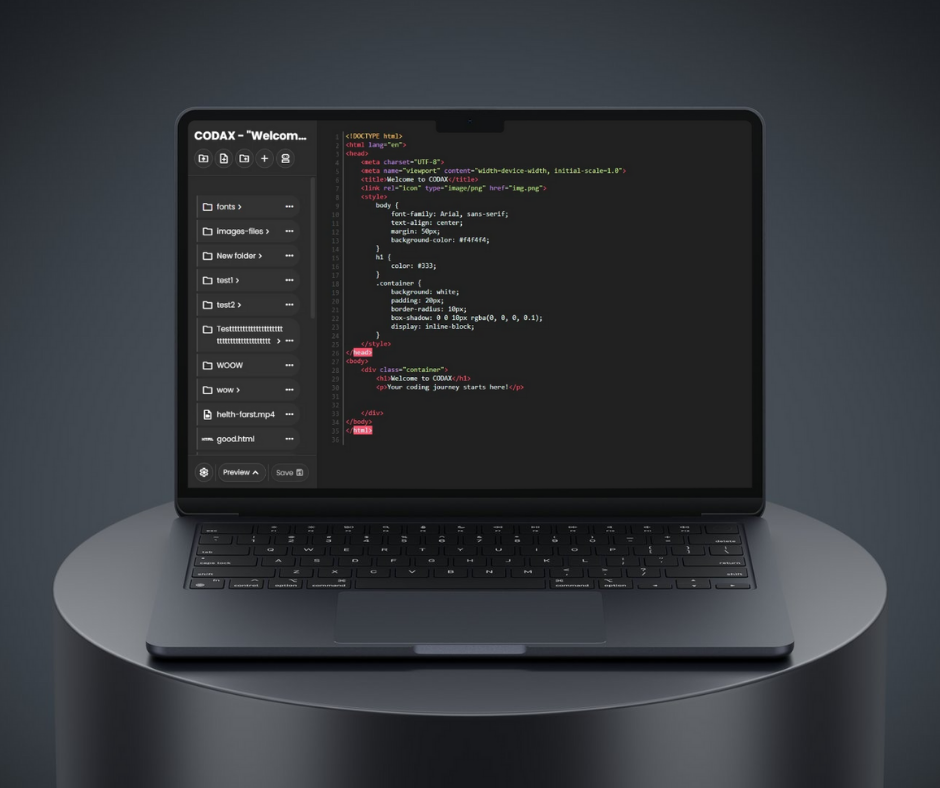
Developer working on code

Notepad vs CODAX

See how CODAX compares to your current text editor

Your Normal Notepad

CODAX

No syntax highlighting
Full syntax highlighting
Single file editing
Multiple file tabs
A normal theme
A clean UI suited for real developers
Can't see media
Can see many types of media.
No AI assistance
Built-in AI in CODAX, called CODAI
And much more! Try it out!

Connect With Us

If you want to connect with us, send us a message via Instagram or visit our website!

Instagram

Message via Instagram

@Chamidu_Fernando

Website

Visit our Website

c-loro.netlify.app

Ready to Upgrade Your Editing Experience?

CODAX is completely free to use with no installations required. Your Notepad files will work just fine.

Start Coding Now